

Paid guest contribution · Updated by HumToSearch on October 19, 2026.
A great soundtrack can turn an ordinary YouTube video into something you want to watch again. Finding its name should not mean scrolling through hundreds of comments without a plan. Start with the clue you already have—a video link, a lyric or the melody—and choose a route that fits your device.
For a link-first starting point, try SongFinder. Its YouTube page brings URL input, audio upload and lyrics into one interface. That is a useful place to begin when you have the video open but do not yet know which clue will lead to the song. We checked its URL-input workflow with two public videos; the steps and screenshot below show what to expect.
Six ways to find the music in a YouTube video
| Your starting point | A practical route | Your next step |
|---|---|---|
| You have the video link | SongFinder’s URL input | Paste the link and follow any playback or audio-sharing instructions |
| The creator may have credited it | Description, Music section and comments | Compare the credited recording with the part you heard |
| You caught a few words | Lyric search | Search a distinctive phrase and check the singer and version |
| The video is playing on another device | Original-audio recognition | Record a clear section where music stands out |
| You are watching on your phone | Same-device music recognition | Check the options available on your device |
| You only remember the tune | Humming search | Hum a recognizable section, then listen to the candidates |
1. Start with the video link in SongFinder
The appeal of a link-input tool is simple: you can begin with the YouTube page already in front of you. SongFinder gives that starting point a dedicated interface, with Audio Upload and Lyrics tabs alongside it if you decide to use a different clue.
What our hands-on check showed
On October 19, 2026, we opened SongFinder’s YouTube page in the desktop ChatGPT in-app browser on macOS. We selected URL Input, pasted each link and clicked Find Song. No SongFinder login or payment prompt appeared before the audio-sharing step.
| Public video used | What we did | What appeared next |
|---|---|---|
| Cartoon, Jéja — On & On, featuring Daniel Levi, on NCS | Submitted the full YouTube watch URL | An embedded player and a request to share the tab’s audio and play the video |
| Coldplay — Fix You, Live in São Paulo | Reloaded the page and submitted the full watch URL | The same audio-sharing and playback step |
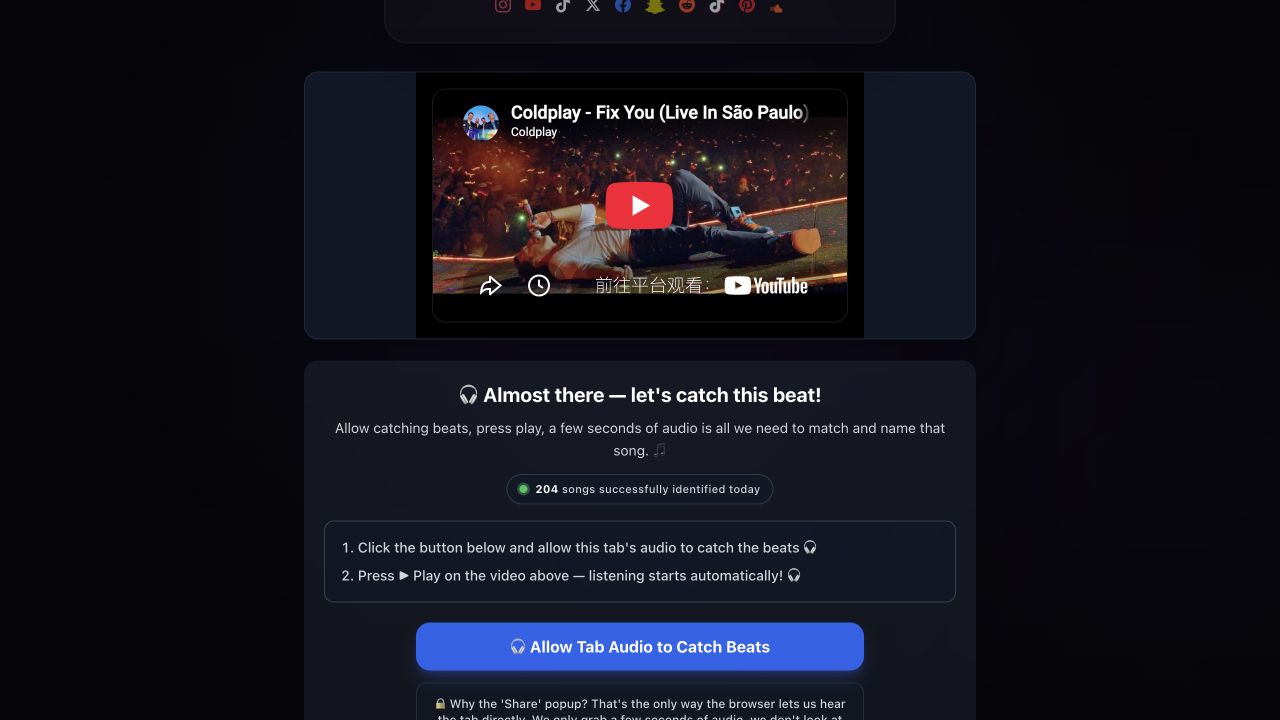
Our October 19 workflow check: after submitting a link, SongFinder displayed the video and prompted us to share tab audio. The title above the player is YouTube metadata, not a recognition result.
This check covered the link-input steps up to the sharing prompt. We did not complete audio sharing or obtain a recognition result, so it does not establish accuracy, speed or performance under narration. Other browser and device combinations were not tested.
Follow the workflow on your device
- Copy the public video’s URL from YouTube’s Share menu.
- Open SongFinder’s YouTube page, paste the URL and select Find Song.
- If a playback or sharing step appears, follow it in a browser that supports the requested audio source. Review what you are sharing and choose only the source you intend to provide.
- Play a section with clearly audible music. If a candidate is returned, compare its title, artist and recording with the soundtrack.
- Stop sharing when finished. If your browser cannot provide the required audio source, choose another route below.
Why give it a try? The interface keeps several useful starting points together: a link when the video is available, an upload when you have an audio file, and a lyrics tab when you remember the words. We tested the URL-input steps; the other tabs were visible but were not functionally tested in this check. Treat a match as a candidate to verify, especially for covers, remixes and live performances.
2. Check YouTube’s description and music credits
Sometimes the answer is already on the page. Expand the description and look for an artist, track title, music-library credit or Music section. YouTube automatically adds music information to some videos through copyright-management systems or its Audio Library. Its music-credit documentation explains why the section may be missing or incomplete.
Check pinned comments and replies, too. For a video with several tracks, note the timestamp where your song begins. A comment mentioning one song may refer to a different section. Listen to the credited recording before treating it as the answer.
3. Search a distinctive lyric phrase
If you can make out a few words, write down a short phrase and search it in quotation marks. Try a second phrase if the first produces unrelated results. Add a language or artist clue only when you have a reason to trust it.
Finding the composition is not always the same as finding the recording. Compare the singer, the chorus and whether the video uses a live version, cover or remix. Our guide to confirming who sings a song helps you narrow down those possibilities.
For instrumental tracks or indistinct vocals, move to audio recognition rather than guessing more lyrics.
4. Let a recognizer listen to the original music
If a computer or second phone can play the video, find a section where music is clearer than speech. Open HumToSearch’s recorder, choose Music is playing and keep the recording page open while the other device plays the section.
A microphone captures sound in the room. If the video is playing through headphones on the other device, the microphone may hear almost nothing. Choose a clear section and check recording permissions before repeating an attempt.
When there is no useful result, our music-playing-but-not-recognized checklist helps you check the input and choose a different next step. We did not compare this route’s accuracy with SongFinder in the workflow check above.
5. Try same-device recognition on your phone
You may not need a second device. Apple documents Shazam Music Recognition and the Shazam app as ways to identify music; the available controls depend on your device. Follow Apple’s current instructions, play the relevant part of the video and compare any result with the soundtrack.
This is a documented alternative rather than a tested winner in our comparison. There is no single result here that proves one service will consistently outperform another on quiet tracks, narration or edited music.
6. Search by humming when only the melody remains
If the video is gone but the tune is still in your head, use a tool that explicitly accepts humming. Google’s instructions describe opening the Google app, choosing the microphone and Search a song, then humming, whistling or singing. See Google’s song-search instructions for the current steps.
Use a segment you remember clearly and listen to potential matches. A failed attempt can reflect the recording, the catalogue or the recognition system. Our humming and lyric-clue guide offers other routes when the first attempt is inconclusive.
If the first method does not find your song
A useful next attempt changes the evidence:
- No audio-sharing option: switch to a supported device workflow, lyrics or video credits. This is an input-path limitation, not a measured recognition failure.
- Music is available but no candidate appears: try a clearer section, then another method. No match alone does not establish whether capture, matching or catalogue coverage was responsible.
- The title fits but the recording sounds different: look for a cover, live performance, remix or speed-altered version.
- Nothing resolves it: ask the creator or a music-identification community with a public link and timestamp. Keep private recordings and private links out of public posts.
Our video-to-song guide explains the recording and file options currently available on HumToSearch. Finding a title does not itself grant permission to reuse the music.
Frequently asked questions
Can I find a YouTube song without installing an app?
A browser-based tool such as SongFinder gives you a way to start with the video link. In our two checks, continuing required an audio-sharing and playback step. Video credits and lyric searches are also useful browser-based routes.
Is SongFinder free?
We did not encounter a payment or sign-in requirement before the sharing step. That observation does not verify unlimited use or the conditions of every feature; check the service’s current terms if those details matter to you.
Why does a tool show the video title but not the song?
An embedded player can display YouTube’s title before recognition happens. Look for a separate song result and compare the recording. If the page is still asking for audio sharing or playback, the identification workflow has not finished.
Does a video-link tool always handle music under narration?
Not necessarily. A link is a convenient starting point, but it does not by itself establish how well a service handles speech, remixes or quiet music. We did not complete a narration or speed-change accuracy test. Choose a clearer section when possible and verify any candidate.
Ready to find the soundtrack? Start with the clue you already have. SongFinder offers a convenient link-first entry point; credits, lyrics and listening tools give you several more ways to reach the right recording.